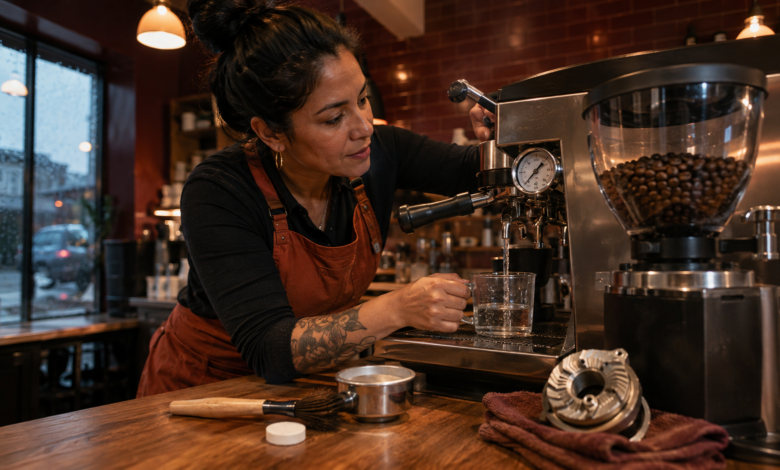
Quick answer: A coffee machine error codes guide covers five main fault categories — water flow errors (empty tank, scale buildup, or failed pump), temperature errors (thermoblock or boiler failure), pressure errors (pump wear or coffee puck issues), grinder errors (jam or motor failure), and cleaning alerts (descaling or cleaning cycle required). Most coffee machine errors are resolved by descaling, cleaning, or adjusting the grind setting — component failures are less common but do occur.
“CALC” — The Alert I Ignored for Six Months
My espresso machine had been displaying a “CALC” alert for about six months. I knew it meant descaling, but I kept dismissing it — the coffee still tasted fine, and the descaling process seemed like a hassle. Then one morning, the machine started producing coffee at a noticeably slower rate, the temperature dropped, and the espresso tasted sour and thin. A week later, the machine stopped producing water entirely and displayed a water flow error.
The descaling cycle I had been avoiding for six months took 30 minutes and cost $8 for a descaling tablet. The water flow error that resulted from ignoring it required a professional service call — $120 to clean a severely scaled flow meter and boiler. This coffee machine error codes guide is the resource I wish I had read before dismissing that first CALC alert.
How Coffee Machine Error Codes Work
Modern automatic and semi-automatic coffee machines use electronic control boards that monitor water flow rate, boiler or thermoblock temperature, extraction pressure, grinder operation, and maintenance cycle intervals. When a sensor reading falls outside the expected range — or a maintenance threshold is reached — the control board displays an error code or alert on the screen, or indicates the fault through a specific LED pattern.
Coffee machine error codes vary significantly by brand and machine type. A fully automatic bean-to-cup machine (such as a De’Longhi, Jura, or Philips) has a different code system from a semi-automatic espresso machine (such as a Breville or Gaggia) or a pod machine (such as a Nespresso or Keurig). The fault categories, however, are consistent: water flow, temperature, pressure, grinder, and cleaning maintenance account for the vast majority of coffee machine errors.
One important distinction: many coffee machine “errors” are actually maintenance alerts — the machine is functioning correctly but is signaling that a cleaning or descaling cycle is due. These alerts should not be dismissed. Scale buildup is the leading cause of coffee machine component failure, and addressing maintenance alerts promptly is the most effective way to extend the life of the machine.
Coffee Machine Error Codes: 5 Categories Explained
1. Water Flow Error Codes — Empty Tank, Scale, or Failed Pump
Water flow error codes (often displayed as “WATER,” “FILL,” a water drop icon, or a specific numeric code) indicate that water is not flowing through the machine at the expected rate. The simplest cause is an empty water tank — always check this first. If the tank is full and the error persists, scale buildup in the flow meter or boiler is the most likely cause in machines that have not been descaled recently.
The flow meter is a small sensor that measures the volume of water passing through the machine. Scale deposits on the flow meter’s impeller can cause it to read incorrectly or stop functioning entirely. Running a descaling cycle is the first step. If the error persists after descaling, the flow meter may need replacement ($15–$40) or the water pump may have failed ($20–$60 for the part, though pump replacement requires disassembly and is best handled by a technician for most consumer machines).
2. Temperature Error Codes — Thermoblock or Boiler Failure
Temperature error codes (often displayed as “TEMP,” a thermometer icon, or a specific code) indicate that the machine is not reaching the required brewing temperature — typically 90–96°C (194–205°F) for espresso. Common causes include a failed thermoblock or boiler heating element, a failed temperature sensor (NTC thermistor), or scale buildup that is insulating the heating element and preventing efficient heat transfer.
Scale buildup on the boiler or thermoblock is the most common cause of temperature errors in machines with a history of infrequent descaling. A descaling cycle removes the insulating scale layer and often resolves temperature errors without component replacement. If the error persists after descaling, the NTC thermistor can be tested with a multimeter, and the heating element can be tested for continuity. Both are generally accessible for repair on most consumer machines.
3. Pressure Error Codes — Pump Wear or Coffee Puck Issues
Pressure error codes are more common on prosumer espresso machines with pressure gauges or digital pressure monitoring. Optimal espresso extraction pressure is approximately 9 bar. Low pressure may be caused by a worn or failing pump, a loose portafilter seal (gasket), an under-dosed coffee puck, or a grind setting that is too coarse. High pressure may be caused by an over-dosed puck, a grind setting that is too fine, a clogged group head, or a blocked shower screen.
⚠️ Important note: Before assuming a pump failure, check the coffee puck variables first — dose, grind size, and tamping pressure. A puck that is too fine or too tightly tamped creates excessive resistance and can produce pressure readings that appear to indicate a pump problem. Adjusting the grind setting one step coarser and reducing tamping pressure often resolves high-pressure errors without any component replacement.
4. Grinder Error Codes — Jam or Motor Failure
Grinder error codes (often displayed as “GRINDER,” a grinder icon, or a specific code on bean-to-cup machines) indicate that the built-in grinder has stopped functioning. The most common cause is a foreign object in the bean hopper — a small stone, a piece of packaging material, or a non-coffee bean that has jammed between the burrs. This is more common than most users expect; coffee beans occasionally contain small stones or debris from the processing facility.
To clear a grinder jam: turn off and unplug the machine, remove the bean hopper, and use a grinder cleaning brush or a wooden skewer to carefully remove any obstruction from the burrs. Never use metal tools near the burrs, and never attempt to clear a jam with the machine powered on. If the grinder is clear but the error persists after restarting, the grinder motor may have failed — a repair that typically requires professional service on most consumer bean-to-cup machines.
5. Cleaning and Descaling Alerts — Maintenance Cycle Required
Cleaning and descaling alerts (often displayed as “CALC,” “CLEAN,” “DESCALE,” or specific icon patterns) are maintenance reminders, not fault codes — the machine is functioning but signaling that a cleaning cycle is due. These alerts should be addressed promptly. Scale buildup reduces water flow, lowers brewing temperature, increases pump wear, and can permanently damage the boiler or thermoblock if left unaddressed for extended periods.
Most manufacturers recommend descaling every 2–3 months in hard water areas (water hardness above 200 ppm) and every 3–6 months in soft water areas. Using filtered water or a water softener significantly reduces scale buildup and extends the interval between descaling cycles. The descaling process typically takes 20–45 minutes and requires a manufacturer-approved descaling solution or tablet ($5–$15).
How I Diagnosed and Fixed My Coffee Machine — Step by Step
Step 1: Identify the Alert and Its Category
After the water flow error appeared, I looked up the specific error code for my machine model. The documentation confirmed it indicated a flow meter fault — the flow meter was not detecting water movement. The manual listed two causes: an empty tank (not the case) or scale buildup in the flow meter (very likely, given the six months of ignored CALC alerts).
What I had not expected: the manual also noted that running the descaling cycle after a flow meter error might not be sufficient if scale had already hardened inside the meter. In severe cases, the flow meter needs to be replaced or professionally cleaned. I had let it get to that point.
Step 2: Attempt a Descaling Cycle
I ran the descaling cycle using the manufacturer’s recommended descaling solution. The cycle completed, but the water flow error returned on the next brew attempt. The scale buildup was too severe for a single descaling cycle to resolve. I ran a second cycle — the error cleared, but water flow was still noticeably slower than normal.
Step 3: Call a Technician for the Flow Meter
After two descaling cycles failed to fully restore normal water flow, I called an authorized service center. The technician confirmed that the flow meter impeller had scale deposits that the descaling solution had not fully dissolved. He cleaned the flow meter manually and ran a pressure test to confirm normal flow. Total cost: $120 for the service call and cleaning. If I had run the descaling cycle when the CALC alert first appeared, this service call would not have been necessary.
Step 4: Establish a Descaling Schedule
After the service, I set a calendar reminder to descale every 8 weeks — more frequently than the manufacturer’s recommendation, because my local water is particularly hard. I also started using a water filter pitcher to fill the machine’s tank, which the technician said would significantly reduce scale accumulation. In the 18 months since the service call, the CALC alert has appeared on schedule and I have addressed it immediately each time. No further errors.
Step 5: Know When Repair Is Not Worth It
The technician also gave me a useful rule of thumb: for consumer-grade automatic coffee machines (under $500), if the repair cost exceeds 40–50% of the machine’s original purchase price, replacement is usually more economical. For prosumer machines ($500–$2,000+), repair is almost always worth it — the components are higher quality and the machines are designed for serviceability. Knowing which category your machine falls into helps frame the repair-vs-replace decision before you call a technician.
Frequently Asked Questions About Coffee Machine Error Codes
What do coffee machine error codes mean?
Coffee machine error codes indicate a specific malfunction or maintenance need in the water flow, temperature, pressure, grinder, or cleaning system. Many codes are maintenance alerts (descaling or cleaning due) rather than component failures. Always look up the code with your specific brand and model number — the same code can mean different things on different machines. Addressing maintenance alerts promptly prevents most component failures.
What causes a coffee machine water flow error?
The most common cause is scale buildup in the flow meter or boiler — especially in machines that have not been descaled regularly. Always check the water tank first (confirm it is full and properly seated), then run a descaling cycle. If the error persists after descaling, the flow meter may need replacement ($15–$40) or the water pump may have failed. In hard water areas, descaling every 2–3 months prevents most water flow errors.
What is a coffee machine descaling alert?
A descaling alert (CALC, DESCALE, or a water drop icon) is a maintenance reminder indicating that mineral scale has accumulated inside the machine. It should be addressed promptly — not dismissed. Run the manufacturer’s recommended descaling cycle using an approved descaling solution or tablet ($5–$15). The process takes 20–45 minutes. Ignoring descaling alerts is the leading cause of coffee machine component failure.
What does a coffee machine pressure error mean?
A pressure error indicates that extraction pressure is outside the optimal range (approximately 9 bar for espresso). Before assuming a pump failure, check the coffee puck variables: grind size (too fine = high pressure, too coarse = low pressure), dose (too much = high pressure), and tamping pressure. Adjusting the grind setting one step at a time often resolves pressure errors. If puck variables are correct and the error persists, the pump or group head gasket may need inspection.
How do I fix a coffee machine grinder error?
Turn off and unplug the machine, remove the bean hopper, and inspect the grinder burrs for foreign objects (stones, packaging debris). Use a grinder cleaning brush or wooden skewer to carefully remove any obstruction. Never use metal tools near the burrs and never clear a jam with the machine powered on. After clearing the obstruction, restart the machine and run a test grind. If the error persists, the grinder motor may need professional service.
Coffee Machine Repair Cost Comparison by Error Type
The table below provides estimated repair costs for common coffee machine error code causes. Costs vary significantly by machine type (consumer vs. prosumer) and brand. DIY costs reflect the part or consumable only; professional costs include a typical service call and labor.
| Error Type | Common Cause | DIY Cost (USD) | Professional Service Cost (USD) |
|---|---|---|---|
| Descaling / CALC Alert | Descaling cycle (tablet or solution) | $5 – $15 | $60 – $120 (if DIY fails) |
| Water Flow Error — Flow Meter | Flow meter cleaning or replacement | $15 – $40 | $80 – $150 |
| Water Flow Error — Pump | Water pump replacement | $20 – $60 | $100 – $200 |
| Temperature Error | NTC thermistor or heating element | $10 – $40 | $80 – $180 |
| Grinder Error — Jam | Foreign object removal | $0 | $60 – $120 |
| Grinder Error — Motor | Grinder motor replacement | $30 – $80 | $100 – $250 |
Note: Costs are estimates based on typical U.S. market rates as of 2024–2025. For consumer-grade machines (under $500), if repair costs exceed 40–50% of the original purchase price, replacement may be more economical. For prosumer machines ($500+), repair is generally worth pursuing. Always obtain a written estimate before authorizing service.
Conclusion: Most Coffee Machine Errors Start with Maintenance
The $120 service call I paid was entirely preventable. The CALC alert had been telling me for six months that the machine needed descaling — a 30-minute, $8 process. Ignoring it turned a maintenance task into a component failure. That is the central lesson of this coffee machine error codes guide: maintenance alerts are not optional notifications — they are early warnings of component damage in progress.
For actual fault codes (water flow, temperature, pressure, grinder), the diagnostic process follows the same pattern as other appliances: identify the fault category, start with the simplest checks (water tank, grind settings, cleaning cycle), and escalate to component testing only if the simple checks do not resolve the issue. Most coffee machine errors are resolved by descaling, cleaning, or adjusting the grind setting — not by replacing parts.
The repair-vs-replace decision for coffee machines is more nuanced than for other appliances. A $150 consumer machine with a $100 repair bill is a replacement candidate. A $1,200 prosumer espresso machine with the same repair bill is worth fixing — and the components are likely to be higher quality and more serviceable. Knowing your machine’s category before calling a technician helps you make that decision with clear expectations.
Sources
- Specialty Coffee Association (SCA) — Water Quality Standards for Coffee Brewing. Available at: sca.coffee
- European Coffee Federation (ECF) — Coffee Machine Maintenance and Safety Guidelines. Available at: www.europeancoffeefederation.com
- NSF International — Water Filter and Softener Certification Standards. Available at: www.nsf.org
- Illy A, Viani R (eds.) — Espresso Coffee: The Science of Quality. Academic Press, 2005. (Standard reference for espresso extraction parameters.)
- Consumer Reports — Coffee Maker Reliability and Repair Survey, 2023. Available at: www.consumerreports.org